
Appearance
Gauss-Boot 微服务基础框架
Gauss后端微服务框架是基于Spring Boot 2.7.x, Spring Cloud 2020.X和Spring Cloud Alibaba 2021.X的一套后端快速开发框架,用于快速的业务开发。
2.0 版本概述
Gauss Boot 2.x升级后将使用JDK17作为默认编译运行环境,气泡鱼平台已经将新集群编译环境和运行环境修改为JDK17。
Gauss Boot 2.x是Gauss Boot 1.x的升级版本,以下是升级内容:
- 升级Spring Boot框架到2.7.x
- 升级默认的Java到JDK17, 默认启用ZGC
- Flyway默认支持TiDB
- Redis Starter封装了更多的方法,如锁,序列生成等。
- 升级Spring Cloud Alibaba 2021.0.5
- 支持三层结构的脚手架生成(2.0.0-CSA-SNAPSHOT)
- 支持从Gauss Boot 1.x升级
- 升级MyBatis Plugs至3.5.3.2
- 升级POI至4.1.2
架构图
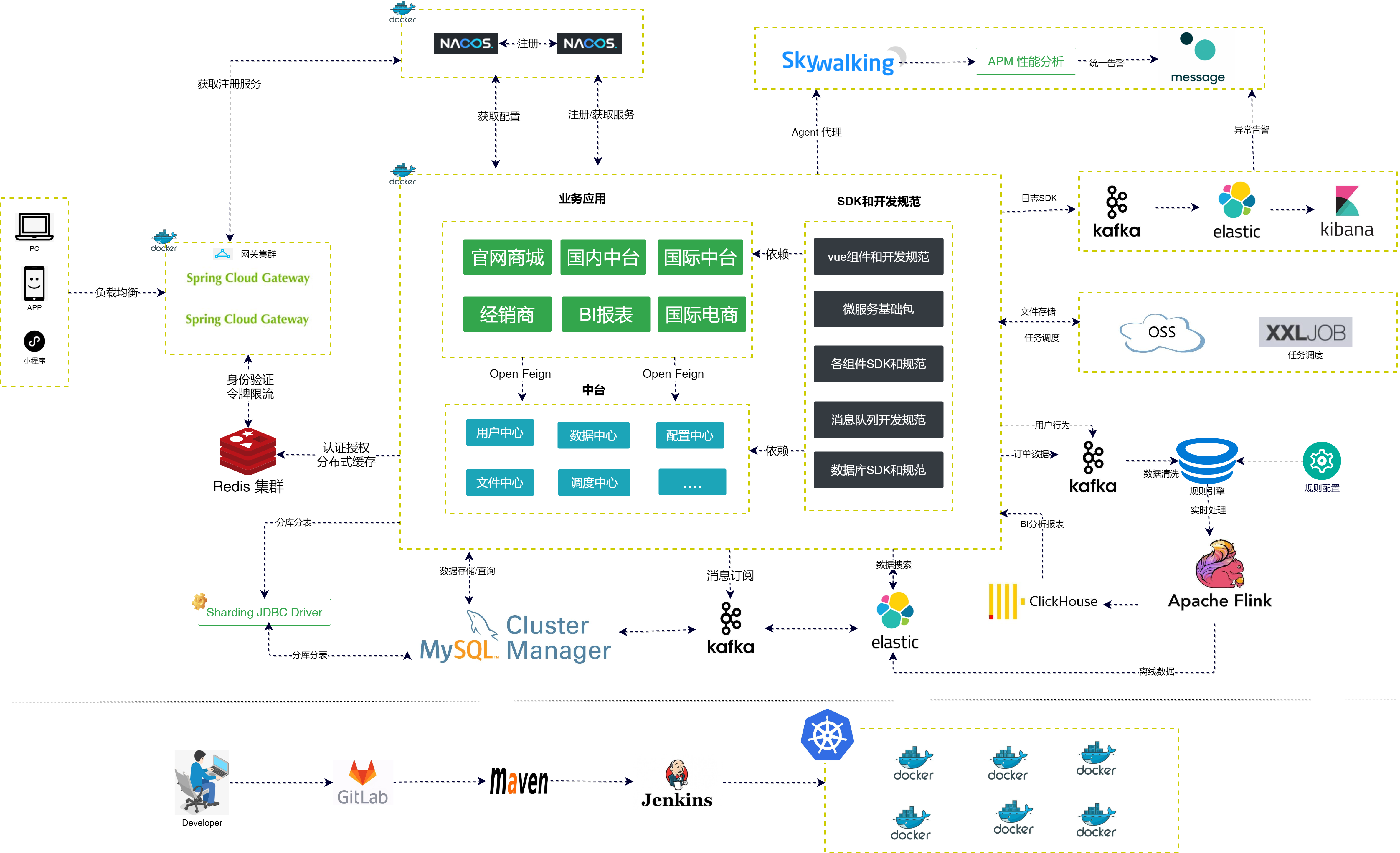
相关技术
| 名称 | Gauss Boot 1.x版本 | Gauss Boot 2.x版本 | 描述 |
|---|---|---|---|
| JDK版本 | 8.x | 17.x | 气泡鱼运行环境JDK版本在2.x后将使用JDK17 |
| GC算法 | G1 | ZGC | 气泡鱼运行环境默认将使用ZGC, JDK8不支持该算法 |
| Spring Boot | 2.5.5 | 2.7.14 | |
| Spring Cloud | 2020.4 | 2021.0.5 | |
| Spring Cloud Alibaba Nacos | 2021.1 | 2021.0.5 | 配置中心+注册中心 |
| Swagger Bootstrap UI | 1.9.6 | 接口文档 | |
| Knife4j | 3.0.3 | 接口文档 | |
| MyBatis Plus | 3.4.3 | 3.4.3 | 数据库持久层框架 |
| MyBatis | 3.5.7 | 3.5.7 | 数据库持久层框架 |
| Spring Cloud OpenFeign | 3.0.4 | 3.1.3 | 服务间调用 |
| Spring Cloud LoadBalancer | 3.0.4 | 3.1.3 | 客户端负载均衡 |
| Spring Data Elasticsearch | 4.2.5 | 4.4.14 | Elasticsearch 持久层框架 |
| Spring Data Redis | 2.5.5 | 2.7.14 | 缓存框架 |
| Xxljob | 2.3.0 | 2.3.0 | 任务调度框架 |
快速开始
要使用Gauss框架,可以使用maven快速构建
安装maven
可以从官网下载maven的二进制包,或者直接点击这里
配置settings.xml
为了使用内部的maven仓库,需要配置内部仓库地址, 具体参考settings.xml
创建项目
命令行创建
可以通过mvn的命令行创建项目
三层结构(client+service+app)
bash
mvn archetype:generate -DarchetypeGroupId=com.tineco.gauss -DarchetypeArtifactId=tineco-basic-archetype -DarchetypeVersion=2.0.0-CSA-SNAPSHOT -DinteractiveMode=false -DarchetypeRepository=https://nexus3.tineco.com -Dversion=1.0.0-SNAPSHOT -DgroupId=cn.sevenyuan -DartifactId=sevenyuan两层结构(client+service)
bash
mvn archetype:generate -DarchetypeGroupId=com.tineco.gauss -DarchetypeArtifactId=tineco-basic-archetype -DarchetypeVersion=2.0.0-SNAPSHOT -DinteractiveMode=false -DarchetypeRepository=https://nexus3.tineco.com -Dversion=1.0.0-SNAPSHOT -DgroupId=cn.sevenyuan -DartifactId=sevenyuan使用idea创建项目
使用idea也可以创建想,参考以下图片 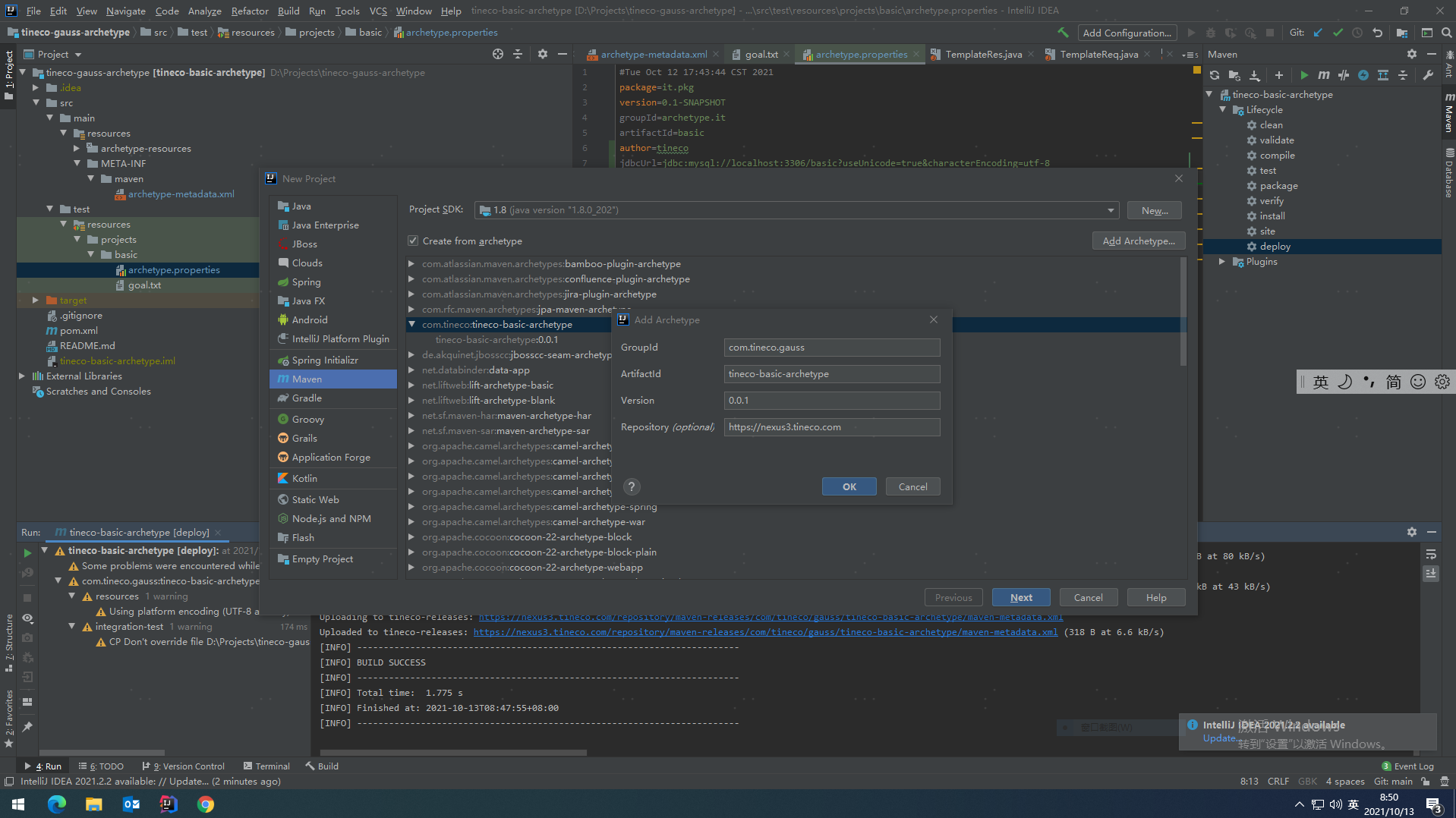
模块列表
gauss-boot-dependencies
gauss-boot-client-parent
gauss-boot-parent
gauss-boot-common
gauss-boot-starter
Excel导入导出
since: 2.0.2
导入
通过@ExcelRequest注解可以实现EasyExcel的导入,具体参考EasyExcel的文档。
@RestController
@RequestMapping("/excel")
@Api("上传测试")
public class ExcelController {
    @PostMapping("/upload")
    @ApiOperation("上传文件")
    public Long upload(@ExcelRequest(value = "file",targetClass = DemoExcel.class) Stream<DemoExcel> stream){
        AtomicLong total = new AtomicLong();
        BatchOperate<DemoExcel> excelBatchOperate = BatchOperate.of((data)->{
            System.out.println(data);
            total.addAndGet(data.size());
        });
        // 批量操作
        stream.forEach(excelBatchOperate::addBatch);
        excelBatchOperate.execute();
        return total.get();
    }
}
参数类型必须是List或者Stream. List参数会将数据读至内存,Stream参数将数据读至文件。
导出
通过@ExcelResponse注解可以实现EasyExcel的导出,具体参考EasyExcel的文档。
通过template可以指定导出的模板,该模板是classpath下面的路径 通过limit参数可以设置最大的导出数量
@RestController
@RequestMapping("/excel")
@Api("Excel测试")
public class ExcelController {
    @GetMapping("/download")
    @ExcelResponse(targetClass = DemoExcel.class,template = "template.xlsx")
    public Stream<DemoExcel> download(){
        return ChunkDataIterator.toStream((i)->{
            if (i<10){
                return Lists.newArrayList(new DemoExcel("1"+i,"1"+i,"1"+i),new DemoExcel("2"+i,"2"+i,"2"+i));
            }
            return Lists.newArrayList();
        });
    }
}
自定义导出
同时可以使用StreamExcelExporter类来实现自定义导出
@Service
public class UserLoginHistoryServiceImpl extends ServiceImpl<UserLoginHistoryMapper, UserLoginHistory> implements IUserLoginHistoryService {

    @Override
    @Transactional
    public void download(OutputStream outputStream) throws IOException {
        Stream<UserLoginHistory> stream =  getBaseMapper().selectStream(Wrappers.lambdaQuery());
        // 导出
        StreamExcelExporter excelExporter = new StreamExcelExporter(outputStream,stream.map(data->{
            UserLoginHistoryDTO dto = new UserLoginHistoryDTO();
            BeanUtils.copyProperties(data,dto);
            return dto;
        }),UserLoginHistoryDTO.class);
        excelExporter.export();
    }
}
该示例直接通过Mybatis Stream查询返回流,通过StreamExcelExporter直接将流返回给客户端。
操作日志集成
应用可以通过@AccessLog集成操作日志,通过配置模式推送到kafka,后续会交给日志服务组件持久化。
java
@RestController
@RequestMapping("/swagger")
@Api("文档测试")
@AccessLog(appId = "demo")
public class SwaggerTestController {

    @ApiOperation("测试")
    @GetMapping("/test")
    @AccessLog
    public String test() {
        return "test";
    }
}
日志配置如下:
yaml
spring:
    kafka:
        bootstrap-servers: 10.108.5.41:9092
        consumer:
            group-id: test
            max-poll-records: 100
            properties:
                max.poll.interval.ms: 300000
            auto-offset-reset: latest
gauss:
    log:
        type: kafka
gauss-boot-starter-jdbc
gauss-boot-starter-mybatis
Mybatis的扩展包
流式查询
Mapper类可以继承StreamSupportMapper, 可以使用selectStream方法返回流。
@Mapper
public interface UserLoginHistoryMapper extends StreamSupportMapper<UserLoginHistory> {

}

@Service
public class UserLoginHistoryServiceImpl extends ServiceImpl<UserLoginHistoryMapper, UserLoginHistory> implements IUserLoginHistoryService {

    @Override
    @Transactional
    public void download(OutputStream outputStream) throws IOException {
        Stream<UserLoginHistory> stream =  getBaseMapper().selectStream(Wrappers.lambdaQuery());
        stream.forEach(System.out::println);
    }
}
注意:
Stream查询必须在事务里面使用。
gauss-boot-starter-mysql
gauss-boot-starter-oracle
gauss-boot-starter-redis
封装了Redis的基本使用场景
- 分布式锁
- 序列生成
- 延时队列
- 实时消息
对于常用的redis操作,请使用RedisTemplate实现。 如果要使用高级功能,请开启redisson.
gauss:
  redisson:
    enabled: true
以下功能均是2.x版本提供的api
声明式锁
声明式锁支持对方法进行加锁,同时key支持参数表达式,支持设置自动释放时间等参数。
该功能需要启用redisson
    @RedisLock(key = "test#{['args'][0]}")
    public void test(String abc){
        log.info("TestBean=>>>>>>>>>>>>>>{}",abc);
    }
序列生成
可以使用@RedisSequence来设置序列,支持传递格式参数,如要以一下格式20230101-000000,用一下方法即可,注意方法返回参数必须是String。
    @RedisSequence(key = "test:1")
    public String test1(Date date){
        return DateFormatUtils.format(date,"yyyyMMddHH")+"-%s";
    }
注:实现方法返回一个字符串格式, 并且用"%s"占位序列位置。
延时队列
通过延时队列可以实现延时回调的功能,注意该功能只能适用简易的延时回调场景,如果需要更可靠的延时队列,请使用rabbitmq提供的队列
public String test1(){
        Date date1 = DateUtils.addSeconds(new Date(), 10);
        Date date2 = DateUtils.addSeconds(new Date(), 5);
        Date date3 = DateUtils.addSeconds(new Date(), 8);
        redissonService.publishDelayQueueMessage("test","999999999999999111111111110000", date1);
        redissonService.publishDelayQueueMessage("test","999999999999999111111111115555", date2);
        redissonService.publishDelayQueueMessage("test","999999999999999111111111118888", date3);
        TimeUnit.SECONDS.sleep(100);
}
事件监听器
@Component
@Slf4j
public class TestDelayQueueListener extends AbstractRedisDelayQueueListener {
    @Override
    protected void onMessage(String message) {
        log.info("消息内容:{}",message);
    }

    @Override
    public String getQueueName() {
        return "test";
    }
}
实时流式消息
通过实时流式消息可以实现实时消息通知等场景,需要redis支持Stream类型
public String test1(){
        for (int i = 0; i < 10000; i++) {
            redissonService.publishStreamMessage("test", UUID.randomUUID().toString(),""+i);
        }
}
流式消息监听器
@Slf4j
public class TestStreamListener extends AbstractRedisStreamListener {

    @Override
    public String getStreamName() {
        return "test";
    }

    @Override
    public String getConsumerGroup() {
        return "group1";
    }

    @Override
    protected void onMessage(StreamMessageId id, Map<String, String> message) {
        log.info("{}:{}",id,message);
    }
}
限流器
可以使用@ReidsRateLimiter实现分布式/单机限流
    @RedisRateLimiter(key="test:rate1")
    public void testRate(){
        log.info("testRate=>>>>>>>>>>>>>>{}",count++);
    }
限流器无法修改全局参数,需要删除redis对应key后方可重新设置全局参数。
PubSub消息
通过AbstractPubSubMessageListener可以实现PubSub模式
redisTemplate.convertAndSend("topic1","test");监听器
@Component
@Slf4j
public class TestPubSubMessageListener extends AbstractPubSubMessageListener {
    @Override
    public void onTextMessage(String topic, String context) {
        log.info("{}:{}",topic,context);
    }

    @Override
    public List<String> getTopics() {
        return Collections.singletonList("topic1");
    }
}
gauss-boot-starter-kafka
简易示例
用于集成spring kafka,基于Spring kafka拓展了@KafkaBatchListener。
注意,使用此客户端后,不能配置spring.kafka.listener.type为batch,框架已经提供了batch listener的集成方式了。
参考配置如下:
yaml
spring:
    kafka:
        bootstrap-servers: 10.108.5.41:9092
        consumer:
            group-id: test
            max-poll-records: 100
            properties:
                max.poll.interval.ms: 300000
            auto-offset-reset: earliest
参考的java实现如下:
java
@Component
@Slf4j
public class TestListener {
    @KafkaBatchListener(topics = "access_log",groupId = "test3")
    public void onMessage(List<ConsumerRecord<String,String>> records){
        log.info("{}",records.size());
    }
    @KafkaListener(topics = "access_log",groupId = "test2")
    public void onMessage(ConsumerRecord<String,String> record){
        log.info("{}",record.value());
    }

}
gauss-boot-starter-elasticsearch
Elasticsearch主要用于全文检索,框架集成了Spring Data Elasticsearch,使得对ES的操作和JPA等方式很相似。
定义一个Entity
java
package gauss.boot.based.elasticsearch.demo;

import lombok.Data;
import org.springframework.data.annotation.Id;
import org.springframework.data.elasticsearch.annotations.DateFormat;
import org.springframework.data.elasticsearch.annotations.Document;
import org.springframework.data.elasticsearch.annotations.Field;
import org.springframework.data.elasticsearch.annotations.FieldType;

@Document(indexName = "gauss_access_log")
@Data
public class AccessLogEntity {
    @Id
    private String id;
    @Field(type = FieldType.Keyword)
    private String userId;
    @Field(type = FieldType.Date,format= DateFormat.epoch_millis)
    private String eventDate;
}
定义Repository
java
public interface AccessLogRepository extends NativeQueryRepository<AccessLogEntity, String> {
}
操作数据
java
@SpringBootTest
class DemoApplicationTests {
    @Autowired
    private AccessLogRepository repository;

    @Test
    void contextLoads() throws Exception{
        String log = "{\"appId\":\"tineco-gauss-demo\",\"function\":\"测试\",\"ip\":\"0:0:0:0:0:0:0:1\",\"message\":\"\",\"method\":\"GET\",\"module\":\"文档测试\",\"url\":\"http://localhost:8080/swagger/test\",\"userId\":\"anonymous\"}";
        AccessLogEntity entity = JSONObject.parseObject(log,AccessLogEntity.class);
        repository.save(entity);
    }
    @Test
    void example(){
        AccessLogEntity entity = new AccessLogEntity();
        entity.setAppId("tineco-gauss-demo");
        Example<AccessLogEntity> example= Example.of(entity, ExampleMatcher.matching().withMatcher("appId", ExampleMatcher.GenericPropertyMatchers.exact()));
        List<AccessLogEntity> entityPage=repository.findAll(example);
        log.info("count:{}",entityPage.size());
    }

    @Test
    void examplePage(){
        AccessLogEntity entity = new AccessLogEntity();
        entity.setAppId("tineco-gauss-demo");
        Example<AccessLogEntity> example= Example.of(entity, ExampleMatcher.matching().withMatcher("appId", ExampleMatcher.GenericPropertyMatchers.exact()));
        Page<AccessLogEntity> entityPage=repository.findPage(example,PageRequest.of(0,100));
        log.info("count:{}",entityPage.getTotalElements());
    }


    @Test
    void exampleStream(){
        AccessLogEntity entity = new AccessLogEntity();
        entity.setAppId("tineco-gauss-demo");
        Example<AccessLogEntity> example= Example.of(entity, ExampleMatcher.matching().withMatcher("appId", ExampleMatcher.GenericPropertyMatchers.exact()));
        Stream<AccessLogEntity> entityPage=repository.findStream(example);
        log.info("count:{}",entityPage.count());
    }
}
gauss-boot-xxljob
用于集成定时任务调度,由xxl job admin作为调度中心。 在框架中使用要引入下面starter
        <dependency>
            <groupId>com.tineco.gauss</groupId>
            <artifactId>gauss-boot-starter-xxljob</artifactId>
        </dependency>
定义一个执行器
通过@XxlJob注解定义客户端执行器
java
@Component
public class SampleXxlJob {
    private static Logger logger = LoggerFactory.getLogger(SampleXxlJob.class);


    /**
     * 1、简单任务示例(Bean模式)
     */
    @XxlJob("demoJobHandler")
    public void demoJobHandler() throws Exception {
        XxlJobHelper.log("XXL-JOB, Hello World.");

        for (int i = 0; i < 5; i++) {
            XxlJobHelper.log("beat at:" + i);
            TimeUnit.SECONDS.sleep(2);
        }
        // default success
    }

}
配置客户端属性
yaml
xxl:
    job:
        admin-addresses: http://10.108.5.41:8850/xxl-job-admin #服务端地址
        access-token: #执行器访问服务端的密钥(一般不需要配置)
        app-name: xxl-job-executor-sample #执行器名称,需要和服务端配置一致
        log-path: d:/logs/xxljob # 执行器日志路径
        address: #执行器注册地址,如果为空,则使用ip:port注册
        ip: # 执行器的回调ip
        port: # 执行器的回调端口
        log-retention-days: 30 # 日志保存时间
配置服务端
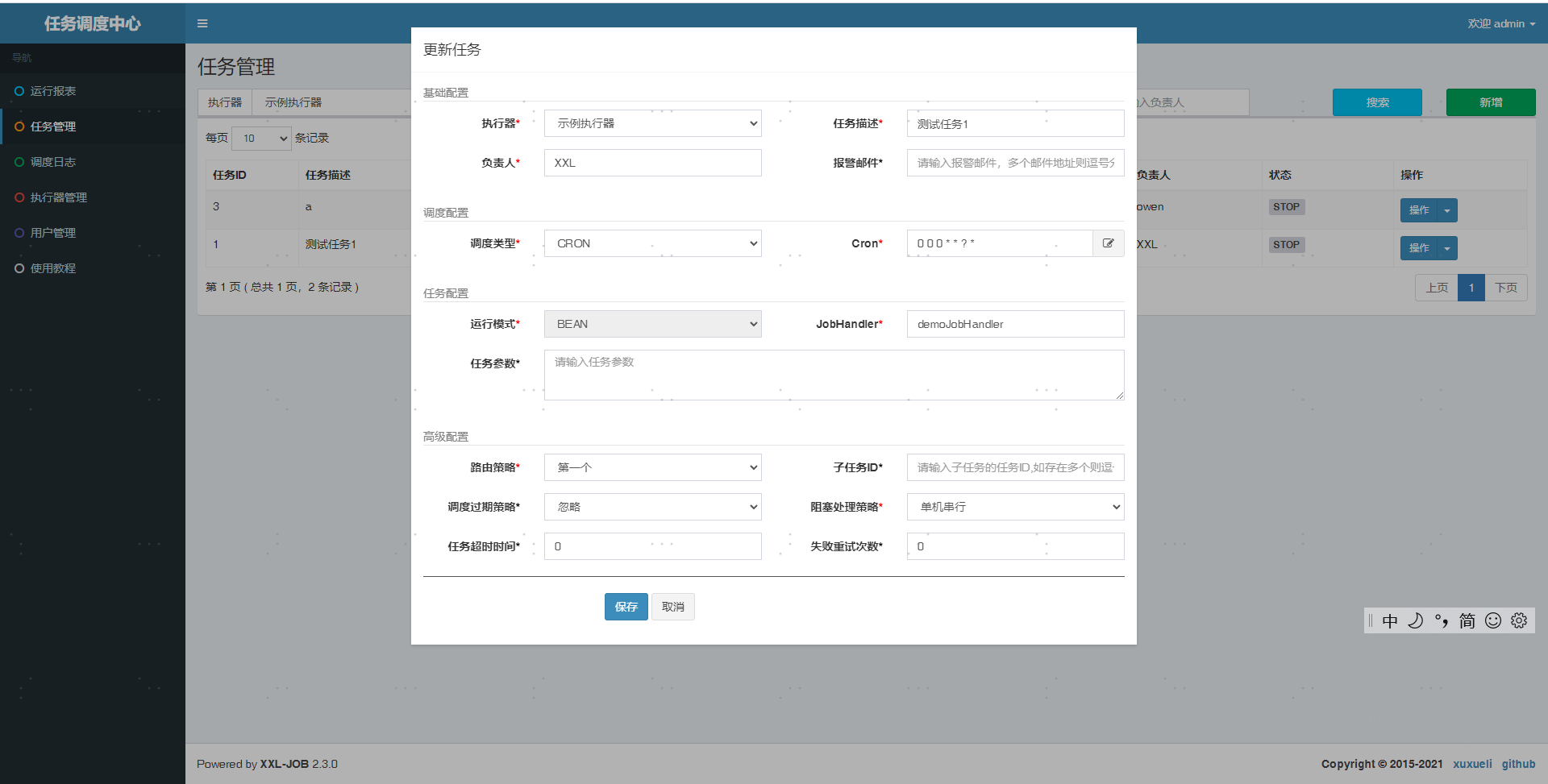
新增执行器 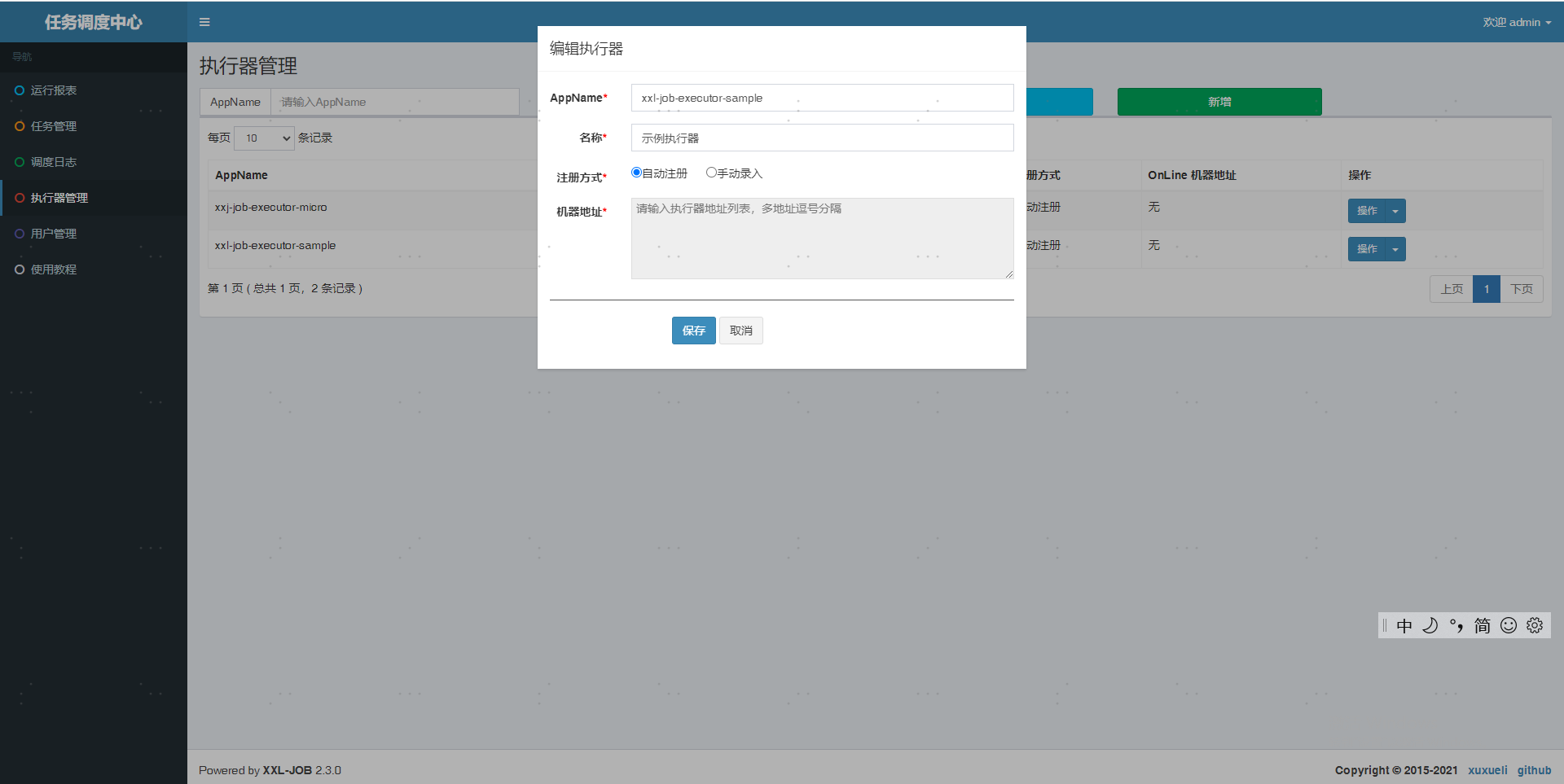 新增执行器的定时任务配置和参数
  查看执行日志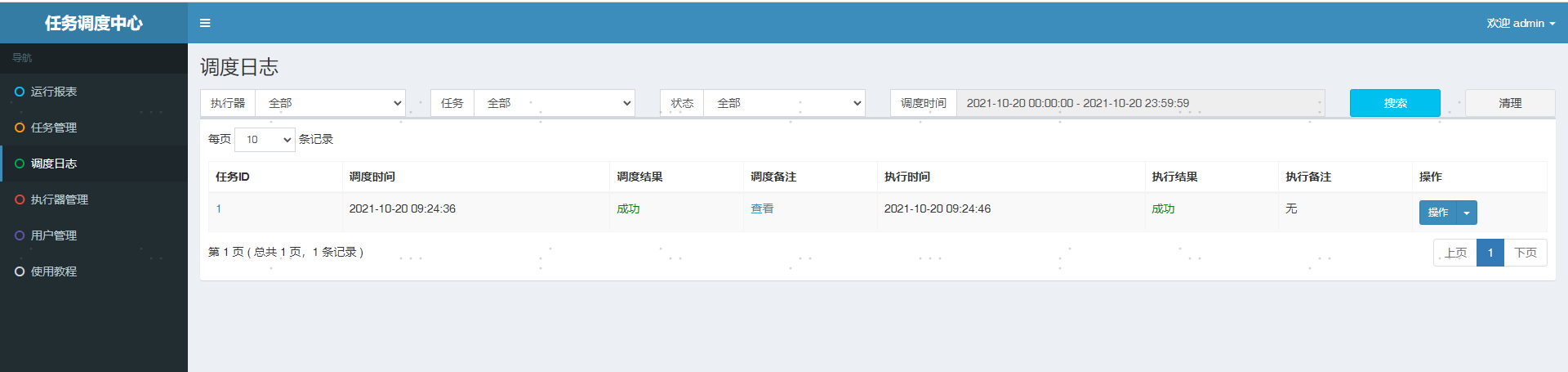
gauss-boot-rabbitmq
队列、交换机、路由定义
普通队列定义
通过什么Bean定义主题、交换机和路由
java
public class Config{
    /**
         * 队列 起名:testDirectQueue
         */
        @Bean
        public Queue testDirectQueue() {
            //一般设置一下队列的持久化就好,其余两个就是默认false
            return new Queue("testDirectQueue", true);
        }

        /**
         * Direct交换机 起名:testDirectExchange
         */
        @Bean
        DirectExchange testDirectExchange() {
            return new DirectExchange("testDirectExchange", true, false);
        }

        /**
         *  绑定  将队列和交换机绑定, 并设置用于匹配键:bindingDirect
         */
        @Bean
        Binding bindingDirect() {
            return BindingBuilder.bind(testDirectQueue()).to(testDirectExchange()).with("testDirectRouting");
        }
}
发送消息
java
@SpringBootTest
class DemoApplicationTests {

    @Autowired
    private RabbitTemplate rabbitTemplate;

    @Test
    void contextLoads() throws Exception{
        Book book =new Book("111");
        this.rabbitTemplate.convertAndSend("testDirectExchange", "testDirectRouting", book);
        Thread.sleep(100000);
    }

}
消费消息
java
@Component
@Slf4j
public class TestListener {

    @RabbitListener(queues = "testDirectQueue")
    @RabbitHandler
    public void listen(BookVO book){
        log.info("{}",book);
    }
}
延时队列定义
通过指定队列的属性x-dead-letter-exchange定义转发交换机名称,x-dead-letter-routing-key定义转发的路由名称,x-message-ttl定义消息过期时间
java
public class DelayConfig{
    /**
     *  队列 起名:testDelayQueue
     */
    @Bean
    public Queue testDelayQueue() {
        Map<String, Object> params = new HashMap<>();
        // x-dead-letter-exchange 声明了队列里的死信转发到的DLX名称,
        params.put("x-dead-letter-exchange", "testDirectExchange");
        // x-dead-letter-routing-key 声明了这些死信在转发时携带的 routing-key 名称。
        params.put("x-dead-letter-routing-key", "testDirectRouting");
        // 声明过期时间5秒,注意不同过期时间的消息请声明不同的延时队列
        params.put("x-message-ttl", 5000);
        return new Queue("testDelayQueue", true, false,false,params);
    }

    /**
     *  Direct交换机 起名:testDelayExchange
     */
    @Bean
    DirectExchange testDelayExchange() {
        return new DirectExchange("testDelayDirectExchange", true, false);
    }

    /**
     * 绑定  将队列和交换机绑定, 并设置用于匹配键:TestDirectRouting
     */
    @Bean
    Binding bindingDelayDirect() {
        return BindingBuilder.bind(testDelayQueue()).to(testDelayExchange()).with("testDelayDirectRouting");
    }
}
2.x升级指南
Gauss Boot支持版本升级,如果低版本升级请参考下面的文档
修改pom版本
修改client和service里面的parent版本
client版本
    <parent>
        <groupId>com.tineco.gauss</groupId>
        <artifactId>gauss-boot-client-parent</artifactId>
        <version>2.0.2-PREVIEW</version>
        <relativePath />
    </parent>
service版本
    <parent>
        <groupId>com.tineco.gauss</groupId>
        <artifactId>gauss-boot-parent</artifactId>
        <version>2.0.2-PREVIEW</version>
        <relativePath />
    </parent>
修改Dockerfile
FROM nexus3.tineco.com/openjdk:17-jdk-slim-sw
...
ENV JAVA_OPTS "-Xmx2048m -Xss512k -XX:+UseZGC"
...
修改.rancher-pipleline.yml
...
  - runScriptConfig:
      image: nexus3.tineco.com/maven:3.8-openjdk-17-slim
...
升级常见问题
启动时报错Connection is unregistered.或Client not connected,current status:STARTING.
原因是客户端gRPC无法和服务端创建连接,请先使用telnet ${nacos.server.address}😒{nacos.server.grpc.port}进行测试,查看网络是否畅通,服务端端口是否已经正确监听。
若服务端没有问题,查看配置是否有误,服务端和客户端的所配置的端口应一致。
若配置也没有问题,查看是否有防火墙或VIP端口转发问题,Nacos2.0的gRPC端口均通过主端口的偏移量计算产生,因此端口转发也需要满足该偏移量。
遇到错误:java.lang.invoke.SerializedLambda.capturingClass accessible: module java.base does not "opens java.lang.invoke" to unnamed module
这个错误是由于MyBatis Plus 3.4.3不支持JDK17, 需要升级MyBatis Plus版本至3.5.3.2或者增加JVM参数
--add-opens java.base/java.lang.invoke=ALL-UNNAMED升级2.x后Mybatis Plus的一些类和方法报错
由于3.4.3的Mybatis Plus不支持JDK17,故我们升级了版本至3.5.3.2, 主要的不兼容如下:
- selectCount返回Long而不是Integer
- PageDto变成PageDTO